Skip to features
PromptiffLAB

PROMPTIFF / DOCUMENT COMPARISON FOR AGENTS

Let your agent write.
Get a comparison too.

Give Promptiff to your agent so it can check a proposal, report, or article against your original requests before delivery.
Receive the document and a comparison link together, making changes and possible omissions easier to inspect.

The open-source CLI and Skill run locally and can use a remote model you choose.

No sign-in for local use · Works with Codex, OpenClaw, and other agents

Semantic comparisonOriginal ↔ medium rewrite
Illustrative English semantic comparison: original on the left, rewrite on the right with blue-to-yellow similarity colors
English illustration: original and medium rewriteCloser Further apart

USE WITH YOUR AGENT

Set up document comparison in your agent

Send these instructions to Codex, OpenClaw, or another agent that can run local commands.
It prepares the tools and checks each document before delivery.

  1. 01 Copy instructions for your agent
  2. 02 Agent compares before delivery
  3. 03 Receive the document and comparison link

Run locally

No API key

Have your agent check documents on its machine and include a comparison link.

For this task, compare each document with my original requests before delivery, then send me the document and comparison link together.

The default checks wording. A local semantic model can also check paraphrases if you choose to install one.
Use a remote model

Your own API

Let your agent use a semantic model you choose while viewing results locally.

Compare each delivered document with my original requests using the remote model I choose. Confirm what will be sent first.

Requires a model API and permission to upload the selected text. The result link remains local.

Automatic comparison applies to the current task as agreed. Add it to project rules for future tasks. A comparison helps locate changes and possible omissions; review the content yourself.

Check edits, rewrites, and agent outputs

Writers can check changes in wording and stance. Editors can locate additions, deletions, and reordered passages. Agent users can compare multi-turn instructions with a selected output to find possible omissions.

To compare your own text online, use Agent Canvas. For instructions and help interpreting results, see the Promptiff guide and FAQ (Chinese).

FEATURES

Choose a comparison view

These English illustrations use the same original and rewrite across all four views.
Open a view to explore the interactive Chinese sample and inspect its matches.

01Semantic comparisonSentences / clauses

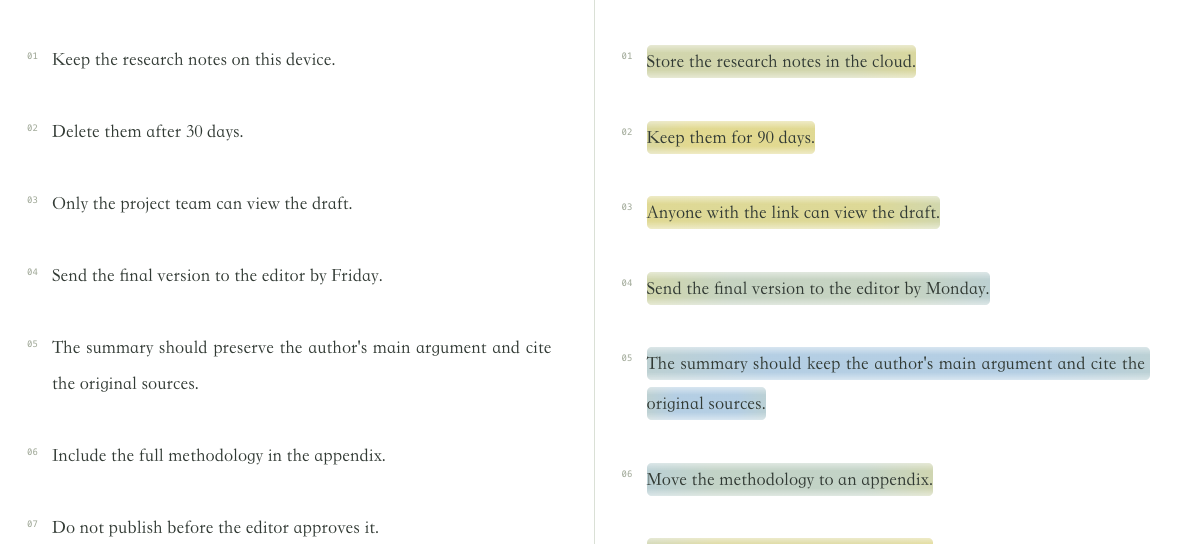
Semantic comparison

Find the original sentence closest in meaning to each rewritten sentence. Select a sentence to inspect its matches.

How it works

  1. The paraphrase-multilingual-MiniLM-L12-v2 model produces 384-dimensional sentence vectors using mean pooling and L2 normalization.
  2. Each rewritten sentence is compared with every original sentence using cosine similarity. The highest score sets its color, and the top three candidates remain available.

Reading the result

Blue means closer in meaning; yellow means further apart. The fixed color scale runs from 0.45 to 0.95, with colors capped beyond that range. Each sentence has one score.

Similarity can miss changes in negation, numbers, or stance. Read the original alongside the rewrite.

Try Semantic comparison
Original textMedium rewrite · Semantic comparison
Semantic comparison: English comparison illustration, original on the left and rewrite on the right; Blue means closer in meaning; yellow means further apart. The fixed color scale runs from 0.45 to 0.95, with colors capped beyond that range. Each sentence has one score.
English comparison illustrationView full image
02Word comparisonWord level

Word comparison

See which words stayed in place, moved, or appeared for the first time. Select a word to inspect its match.

How it works

  1. Chinese text is segmented with jieba in precise mode (HMM). The closest original sentence is selected using word overlap (65%) and adjacent two-character overlap (35%).
  2. Overlap uses a Dice score: twice the shared amount divided by the total amount in both sentences. Words are weighted by IDF, so rarer original words count more; character pairs are compared as sets.
  3. Word order is matched next. Words kept in order score 1; reused words that moved score 0.65–0.85; new words score 0.05 plus 0.5 times their best character similarity.

Reading the result

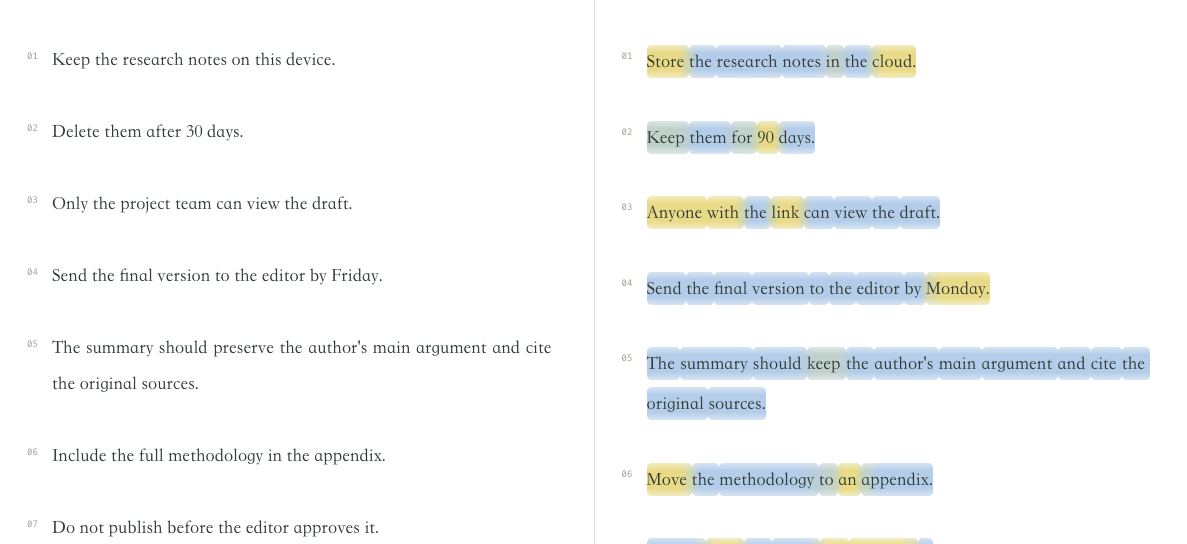
Blue means closer wording and yellow means greater difference on a 0–1 scale. Punctuation inherits the nearest word’s color; select a word to inspect the match.

This measures retained words and positions, not meaning. It helps show how extensively text was rewritten.

Try Word comparison
Original textMedium rewrite · Word comparison
Word comparison: English comparison illustration, original on the left and rewrite on the right; Blue means closer wording and yellow means greater difference on a 0–1 scale. Punctuation inherits the nearest word’s color; select a word to inspect the match.
English comparison illustrationView full image
03Git-style diffSentences / clauses

Git-style diff

Read the original on the left and the rewrite on the right. Long paragraphs become lines you can check one by one.

How it works

  1. Text is split at sentence punctuation. Passages over 100 characters are split at commas, then by length if needed, without dropping characters.
  2. SequenceMatcher aligns the sentence sequences. Replacement blocks appear side by side, with character changes marked inside each block.

Reading the result

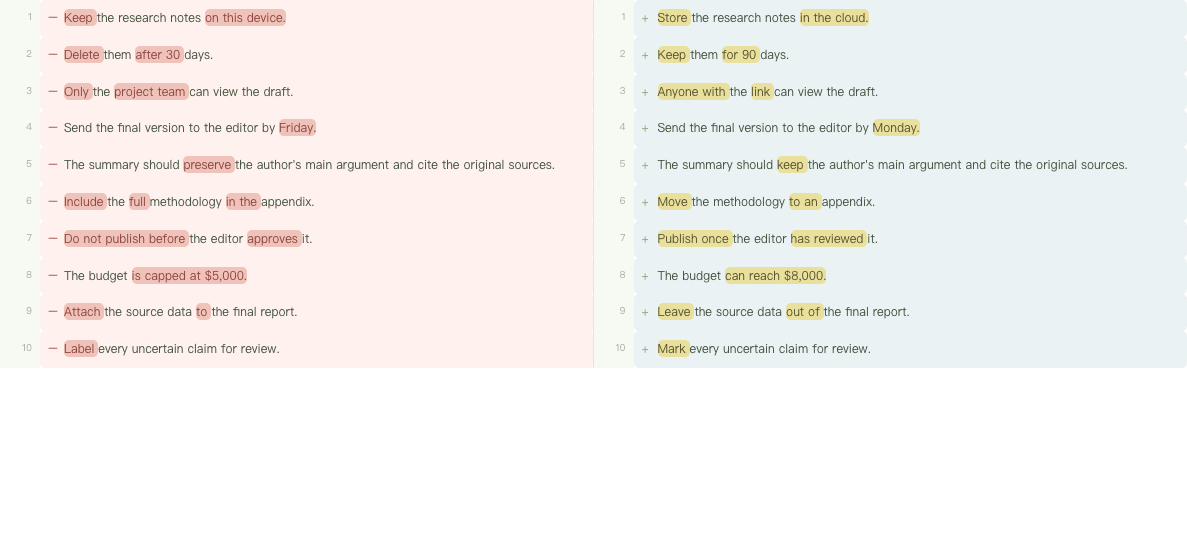
Red on the left marks deletions; yellow on the right marks additions and replacements. “Changes only” hides unchanged lines.

Rows are aligned by position, not necessarily by meaning. This view helps inspect edits and structural changes.

Try Git-style diff
Original textMedium rewrite · Git-style diff
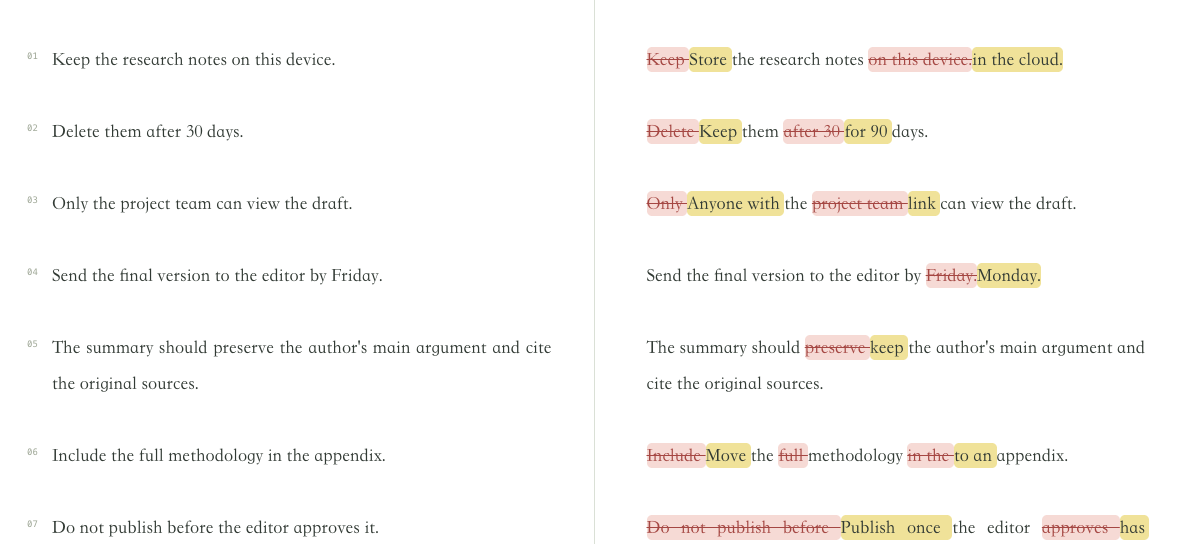
Git-style diff: English comparison illustration, original on the left and rewrite on the right; Red on the left marks deletions; yellow on the right marks additions and replacements. “Changes only” hides unchanged lines.
English comparison illustrationView full image
04Character comparisonCharacter level

Character comparison

Inspect deletions, replacements, and additions in the full text, with surrounding context.

How it works

  1. The original and rewrite are compared as character sequences with SequenceMatcher (autojunk disabled).
  2. Unmatched spans are classified as deletions, additions, or replacements and shown beside the complete revised text.

Reading the result

Red strikethrough marks deleted text, yellow marks replacements, and muted blue marks additions. Hide deletions to read the rewrite continuously.

Useful for checking exact wording. Moved paragraphs may appear as a deletion and an addition.

Try Character comparison
Original textMedium rewrite · Character comparison
Character comparison: English comparison illustration, original on the left and rewrite on the right; Red strikethrough marks deleted text, yellow marks replacements, and muted blue marks additions. Hide deletions to read the rewrite continuously.
English comparison illustrationView full image

TRY A SAMPLE

Open an example and inspect the edits.

All four views use a fixed Chinese sample and precomputed results. To compare your own prompts and outputs, open Agent Canvas (currently a Chinese interface).
Colors show similarity. They do not measure the probability of AI authorship or establish factual accuracy, authorship, or unchanged meaning.

Open a comparison